
For Colorado managing brokers
Every deal, every agent, every deadline. On one screen.
Your name is on every deal. Now you can see every one.
Brokerage plans · Set up from your roster · Built for Colorado
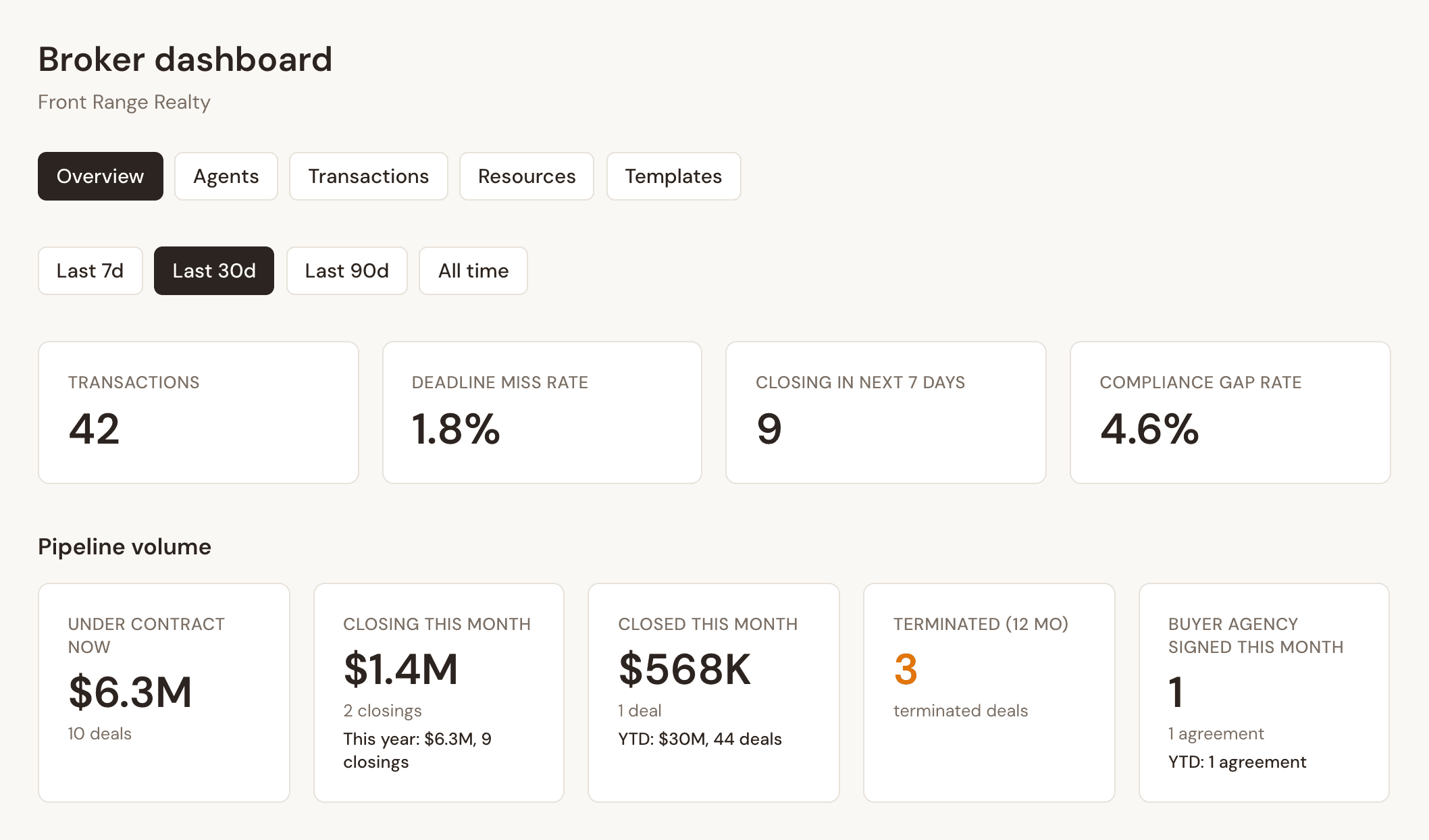
Real dashboard · example data
The whole office at a glance
Your Monday morning, in one minute.
Open the dashboard, or read the 7 a.m. Monday email. Either way you know where the office stands before the first call.
01 / 04
Deadline miss rate
Deadlines that slipped past due, across the whole office. One number tells you if the system is holding.
02 / 04
Compliance gap rate
Required items still open on your deals. When it climbs, you know before an audit does.
03 / 04
Closing in next 7 days
What should fund this week, so nothing surprises you on Friday.
04 / 04
Under contract
Your live pipeline and its volume, with closed and fallen-through deals counted beside it.
Top risks
Know which deal is in trouble before your agent does.
Every deal is scored on what needs attention first. The riskiest rise to the top, with the reason in plain words.
- Missed deadlines
- Deadlines due in the next 3 days
- Open compliance items, before they hold up a commission
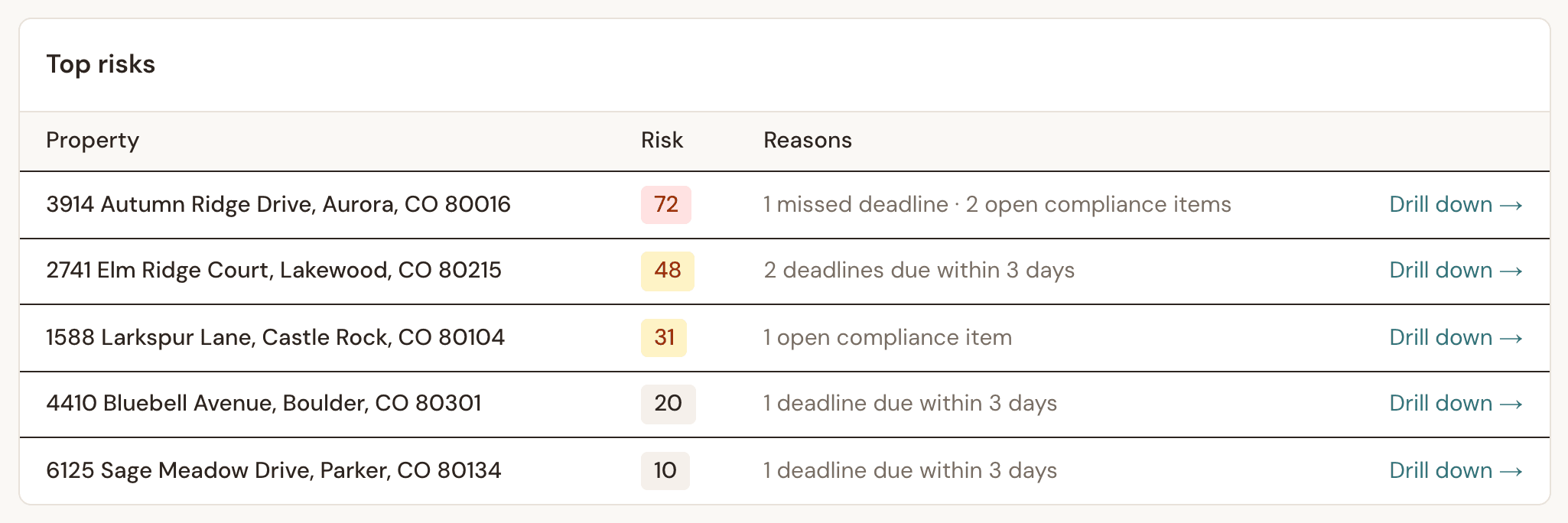
Drill down opens the file: parties, documents, deadlines, findings and the full activity trail.
Supervision
Every file reviewed and logged, before CREC asks.
- Open any fileParties, documents, deadlines and compliance findings for every deal in the office.
- Approve or flag documentsReview each document, add a note. Every review is recorded.
- One audit trail per dealContract edits, counters, amendments and reviews in one timeline.
- Changed CREC forms, explainedWhen an agent changes the wording of a CREC form, Done-Deal lists every change. Before it sends, the agent confirms they explained the changes to the client, and that is recorded.
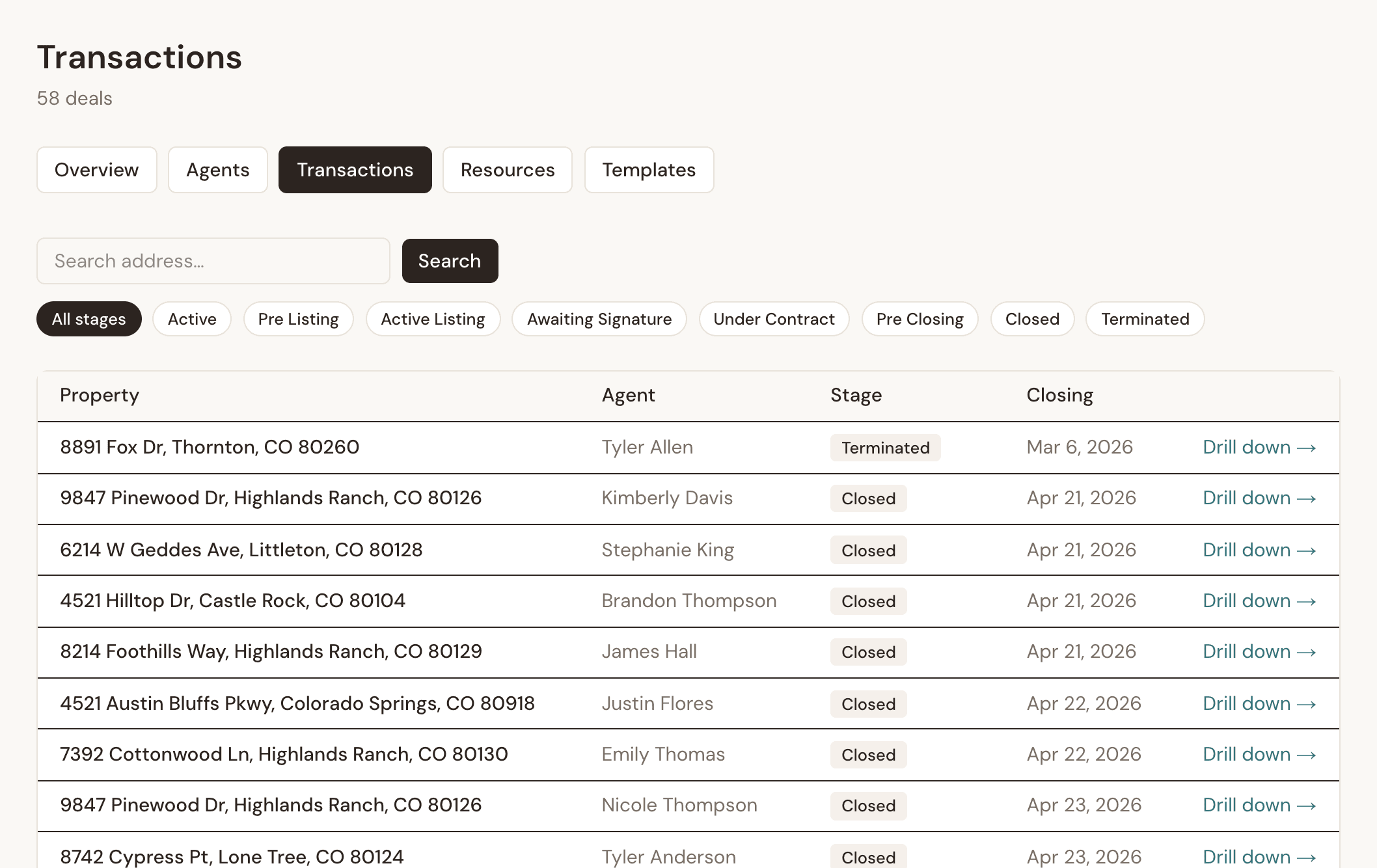
Your agents
Know who is actually using it.
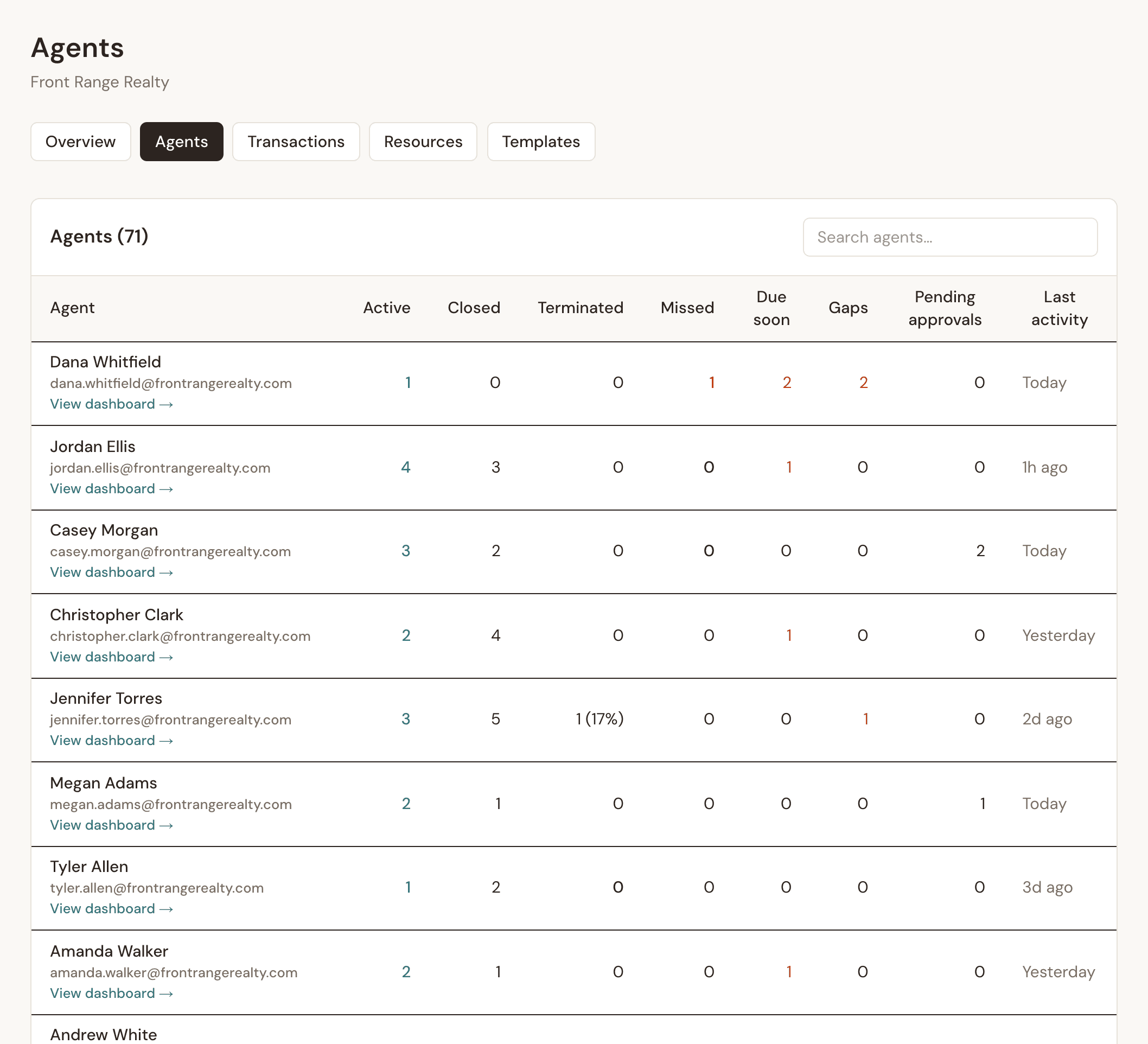
See how many agents from your roster have signed up, who is active, and each agent's deals and fall-through rate. Click any agent to see their pipeline.
One office, one standard
Your templates. Your policies.
Publish templates to every agent and mark them required. Upload your training guides and policies, and Reme uses them to answer your agents' questions.
Recruit and keep agents
Give every agent a 24/7 TC.
Reme, the AI transaction coordinator, tracks every Colorado deadline, drafts the follow-ups and catches the required disclosures. Your agents get time back. You give agents another reason to choose your office.
See what agents get- Every deadline calculated from MEC
- Drafts the emails for the agent to approve (Autonomous mode is opt-in, deal by deal)
- Lead paint disclosure flagged on pre-1978 homes
- Asks about HOA, well, septic and solar, then adds the follow-up tasks
- Works nights and weekends
CTM eContracts
Works with CTM agents. Switch in five steps.
Your agents don't need the other side to switch. And when they're ready to move their own work, it comes with them.
- CTM offers land on the listingA CTM offer sent to the agent's Done-Deal address lands on the listing for the seller to sign. The signed copy goes back by email.
- The same state-approved formsLicensed from the Colorado Division of Real Estate. The same documents CTM uses.
- A deal email that works like mail2dbEach deal has its own address. Paperwork sent there lands on the deal.
- 1Add the import buttonOne drag to the bookmarks bar.
- 2Run it in CTMActive deals by default, closed history if you want it.
- 3Review what came overParties, deadlines and documents for every deal.
- 4Download the migration certificateA printable record of exactly what moved.
- 5Check the documentsEach deal's CTM documents are attached to that deal in Done-Deal. Re-run the import to fill any gaps.
- Everything is copied. The agent's CTM account is never changed, and past records stay where they are.
Security
Signatures you can defend.
When a deal is questioned, you need proof of who signed, when, and that nothing changed after. Ask your current platform for this.
- A private link for every signerEach person gets their own one-time link. It cannot be guessed, and it expires.
- A signature certificateWho signed, their role, the exact time and IP address, and the signature itself, filed with the deal.
- A record no one can quietly changeEach recorded event on a deal is chained to the one before it. One click on the Activity tab proves none of those records was altered.
- Signatures locked once signedThe database itself refuses to edit or delete a completed signature.
- Private documentsDownload links expire in 5 minutes. Only the agent, their managing broker and the assigned coordinator can open a file.
- Your brokerage, walled offEach brokerage's data is isolated, and broker views are scoped to your office only.
Quick answers
How do my agents get set up?
Send us your roster. We set up a seat for every agent and track who has signed up on your dashboard.
What do my agents see that I see?
Their own deals. You see every deal in your brokerage. Each agent's private goals stay private.
Is our data separate from other brokerages?
Yes. Each brokerage is isolated, and broker views are scoped to your brokerage only.
Do practice deals throw off the numbers?
No. Practice and demo deals are left out of every broker number.
Can we use our own clauses and templates?
Yes. Publish any agent template to the whole office, and mark it required for buyer or seller deals.
What does it cost?
Brokerage plans are priced per seat and set up directly. Book a walkthrough and we'll put one together for your office.
How does an agent transition from CTM to Done-Deal?
With the Switching from CTM wizard, in five guided steps: add the import button, run it in CTM, review what came over, download the migration certificate, and check the documents. Deals, their documents and personal clauses are copied. CTM is never changed, and agents can run both while current deals close.
How does a Done-Deal agent work with a CTM agent?
The other agent stays on CTM and needs no Done-Deal account. Both sides use the same state-approved forms. A CTM offer sent to the agent's Done-Deal address lands on the listing for the seller to sign, and the signed copy goes back by email. CTM's screen may not show every step, so the emailed PDF is the record.
See your office on one screen.
A short walkthrough · Your questions · No commitment
Book a walkthrough