
Managing your subscription
Everything about your subscription lives on the Billing page, reached from the app menu. This article covers what you see there and how to make changes. For what each plan costs, see Plans and pricing.
Forms & Contracts and the AI TC add-on are billed separately
Billing shows two sections, because they're two separate products on your account:
- Forms & Contracts — the base platform.
- AI Transaction Coordinator — the add-on that puts Reme on your files.
Each section shows an Active badge when that product is subscribed. You can have Forms & Contracts active without the AI TC add-on, or subscribe to both. Canceling one does not cancel the other.
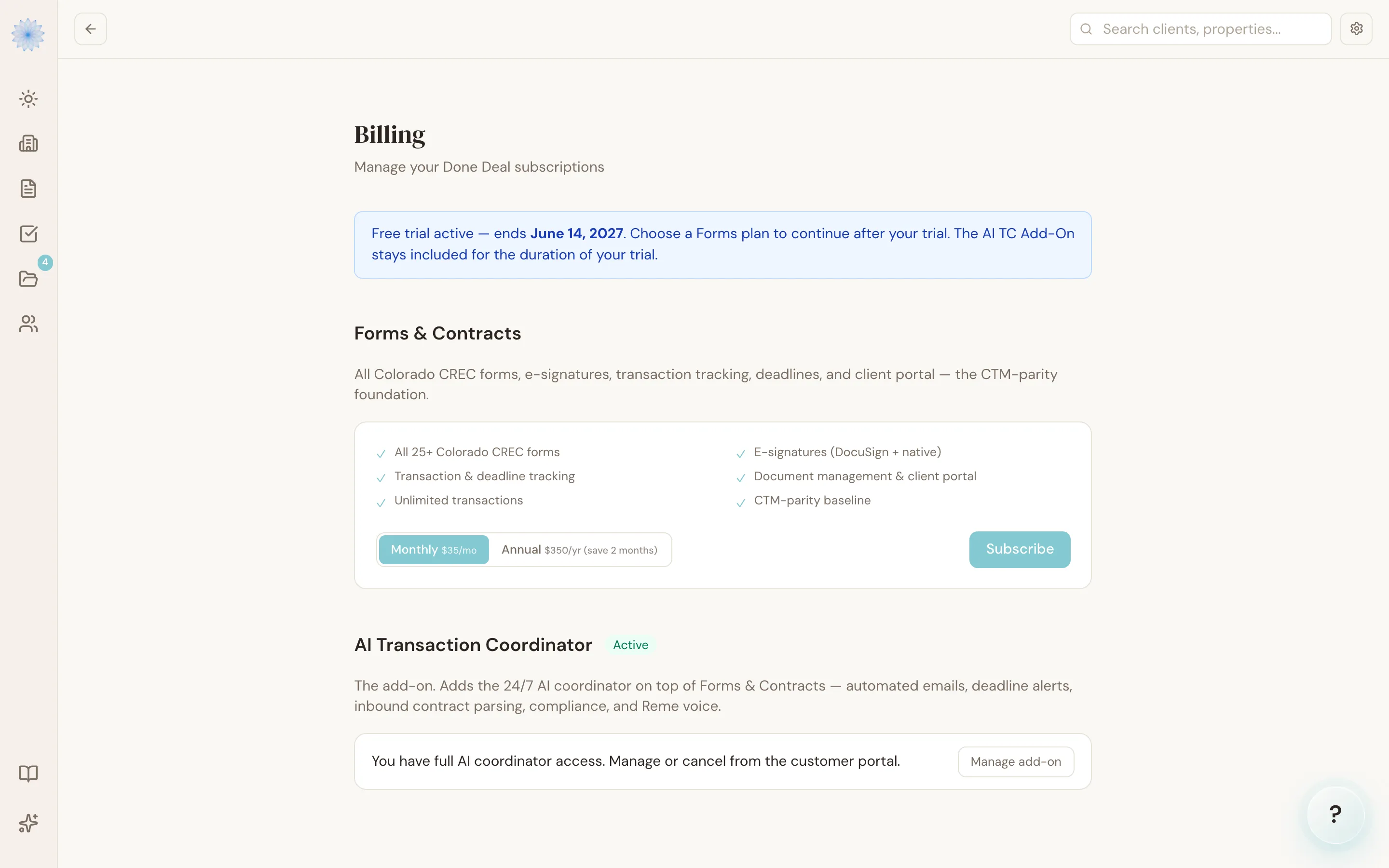
Subscribing to a plan
If a product isn't active yet, its section on Billing shows what's included and a billing-frequency toggle.
- Choose Monthly or Annual.
- Click Subscribe (Forms & Contracts) or Add to your plan (AI TC add-on).
- You're redirected to a secure Stripe Checkout page to enter payment details.
- After payment, you land back on Billing with a confirmation banner.
Updating your payment method or canceling
Once a product is active, its card on Billing shows a Manage subscription (or Manage add-on) button instead of a subscribe button.
- Click Manage subscription or Manage add-on.
- Done-Deal opens Stripe's hosted billing portal in your browser — this is where you update your card on file, view past invoices, and cancel.
- Make your change in the Stripe portal, then return to Done-Deal.
Note: Done-Deal doesn't store or display your card details or invoice history directly — that's all handled inside Stripe's portal, which only your account can open.
If a payment fails
If a charge on your Forms & Contracts subscription fails, Billing shows a Payment failed banner with an Update payment method button. Your account stays open while Stripe automatically retries the charge — you won't lose access immediately, but you should update your card before the retries run out.
Trials
New accounts start on a free trial. While you're trialing, Billing shows a banner with your trial end date and reminds you the AI TC add-on is included for the duration of the trial. Subscribe to a Forms & Contracts plan before the trial ends to keep working without interruption — see FAQ and troubleshooting for what happens if a trial expires unsubscribed.
FAQ
Can I cancel just the AI TC add-on and keep Forms & Contracts?
Yes. They're managed independently — open Manage add-on on the AI TC section and cancel there. Your transactions, forms, and e-signing continue on Forms & Contracts.
Where do I find my invoices?
In the Stripe billing portal, opened from Manage subscription or Manage add-on. Invoices aren't listed inside the Done-Deal app itself.
I don't see a Manage subscription button — why?
You'll only see it once a product is active. If you're still trialing or haven't subscribed yet, you'll see the Subscribe flow instead.
Does canceling take effect immediately?
See Plans and pricing for the cancellation policy. The Stripe portal walks you through confirming the cancellation before it's final.
Related articles
Still stuck?
Email support@done-deal.co and a real person will get back to you — usually the same business day.