
A tour of Home and Today
Your dashboard is the first thing you see after signing in. This article covers what's on it. Depending on when your account was set up, you'll land on either Home (the current dashboard) or Today (the earlier version) — Today automatically forwards you to Home on accounts where the newer dashboard is turned on.
Home
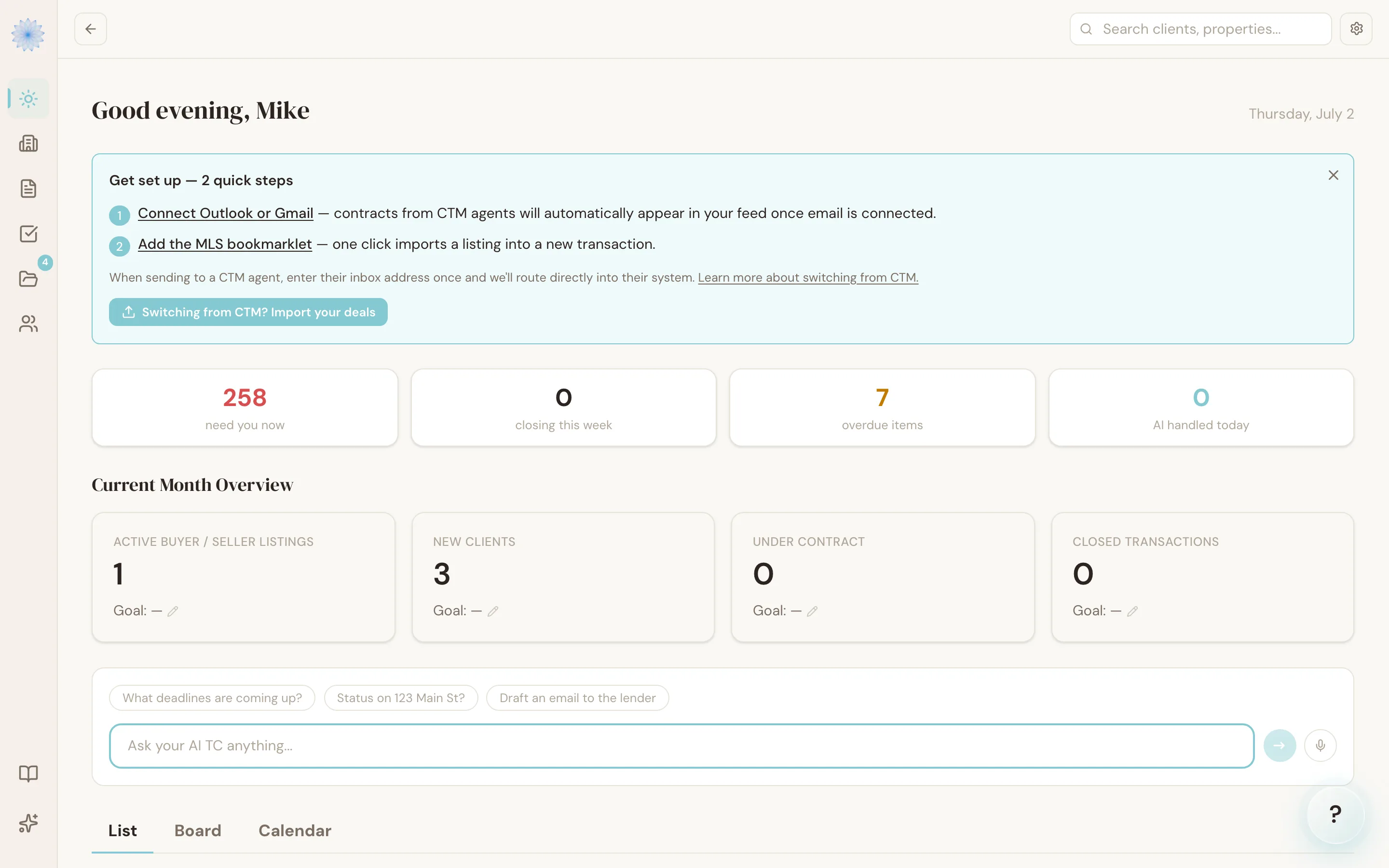
Home greets you by name and shows the day's date at the top. Below that:
- Switching-from-CTM card — if you're mid-transition from CTM eContracts, a dismissible card walks you through connecting email and adding the MLS bookmarklet, and links to import your existing deals.
- Stats row — four numbers at a glance: transactions that need you now, deals closing this week, overdue items, and how many things your AI handled today.
- Current month overview — KPI cards for Active Buyer/Seller Listings, New Clients, Under Contract, and Closed Transactions for the current month.
- Ask TC — a box for asking Reme questions directly, shown if you have the AI TC add-on.
- Deals — your transaction list, with a List / Board / Calendar switcher above it. List is the default view.
- AI assistant — a collapsed panel you can expand for more detail:
- Needs You — AI actions waiting for your approval, grouped into Today and This Week.
- What's Ahead — upcoming deadlines across all your transactions, color-coded by how urgent they are, linking straight to the transaction.
- Your AI Handled Today — a running list of what Reme completed without needing you.
Note: The AI assistant panel is part of the AI TC add-on. Without it, this section shows a prompt to add the add-on instead of Needs You. See Plans and pricing.
Today
On accounts still using the earlier dashboard, Today is what you land on after signing in. It shows:
- Your Transaction Pipeline — your five most recent active transactions, each with a progress bar showing completed vs. total tasks.
- Today's Priorities — with the AI TC add-on, your top three pending AI actions, ranked by risk level (high, medium, low). Without the add-on, a prompt to add it appears here instead.
- Quick actions — buttons to start a New Transaction or open the Feed.
FAQ
Why do I see Today instead of Home?
Which dashboard you see depends on your account's settings. If you'd expect to be on the newer Home dashboard and you're still seeing Today, ask your brokerage admin or contact support.
What counts toward "needs you now" on Home?
Pending AI actions — anything Reme has drafted or flagged that's waiting in your Feed for approval.
Can I collapse the AI assistant panel on Home permanently?
It's collapsed by default each time you load Home; expand it when you want to see Needs You and What's Ahead, and it stays open for that visit.
Does the stats row update in real time?
It refreshes automatically while the page is open, and again whenever you switch back to the tab.
Related articles
Still stuck?
Email support@done-deal.co and a real person will get back to you — usually the same business day.