
What the signer sees when you send a contract
When you send a contract for signature, each recipient gets a link by email. They don't need a Done-Deal account or login to use it. This article walks through what they see, step by step — useful for setting expectations with a client before you send.
The email
Each recipient gets an email titled "Signature requested," with your name and the form name ("[Your name] has prepared a [form name] for your review and signature"). It has one button: Review & sign.
<!-- screenshot: e-signing/signature-email -->Opening the link
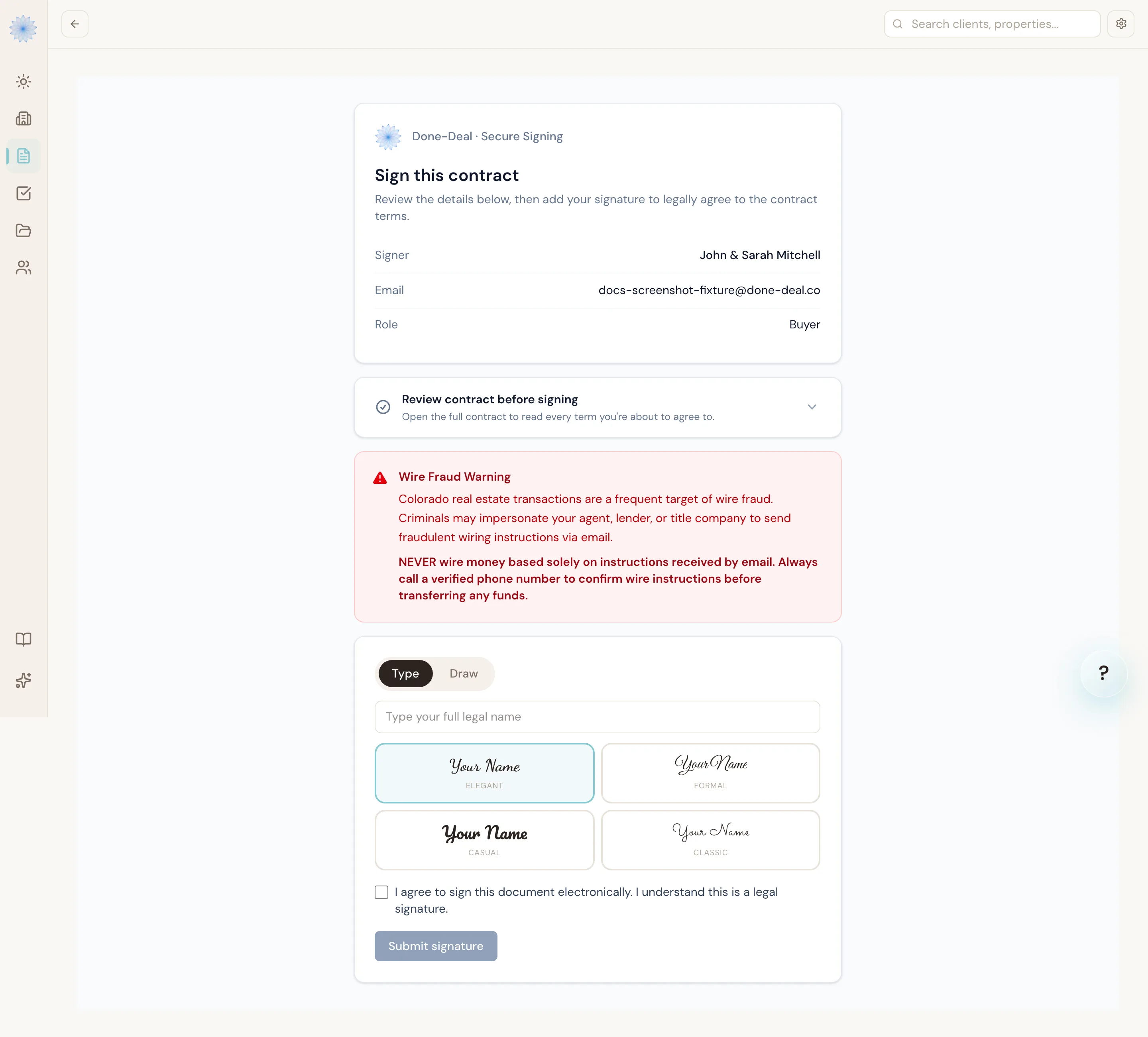
The link opens a page headed "Done-Deal · Secure Signing." No login screen — the link itself, not a password, is what grants access. At the top, the page shows who's signing:
- Signer name
- Role (buyer, seller, etc.)
Note: Each recipient gets their own unique link. It only works for that person's signature request, and it stops working once they've signed, once it expires, or if it's no longer valid for another reason.
Reviewing the contract
Before signing, the recipient can read the actual contract — the same document the agent sent, not a summary. This lets them review every term before adding their signature.
Every contract signing page also shows a Wire Fraud Warning: a reminder that Colorado real estate transactions are a frequent target of wire fraud, and that they should never wire money based only on emailed instructions — always confirm by calling a verified phone number first.
Verifying identity (if enabled)
Some agents turn on text-message verification for extra security. If your agent has this on, the recipient sees a Send Verification Code button first. Entering the 6-digit code sent to their phone unlocks the signature step. If the agent hasn't turned this on, or the recipient has no phone number on file, this step is skipped entirely — there's no added friction.
Signing
The recipient draws their signature with a mouse, trackpad, or finger. Below the signature box is a required checkbox:
"I agree to sign this document electronically. I understand this is a legal signature."
They can't submit until they've drawn a signature and checked that box. Clicking Submit signature records it immediately — no separate confirmation screen or redirect. The page updates in place to say:
"Thank you. Your signature is recorded."
If something's wrong with the link
- No token in the link — "Missing signing link. This page must be opened from the link in your email."
- Invalid or reused link — "This link is no longer valid. Please contact your agent for a new one."
- Already signed — "Already signed. Thank you — your signature was already recorded for this contract."
- Expired link (links are valid 14 days) — "This signing link has expired. Please contact your agent for a new one."
FAQ
Do I need a Done-Deal account to sign?
No. Signing links work without creating an account or logging in. The link in your email is your access.
What if I don't have a smartphone for text verification?
If your agent requires it and you don't have a phone number on file, tell your agent — they can update your contact information so you can complete the code step.
Can I sign on my phone?
Yes. The signing page works on any device with a browser and a way to draw a signature (finger, mouse, or trackpad).
What happens after everyone signs?
Once every required party has signed, the contract is fully executed. Your agent is notified automatically.
Related articles
Still stuck?
Email support@done-deal.co and a real person will get back to you — usually the same business day.