
Building and using the clauses library
If you find yourself typing the same paragraph into Additional Provisions or Exclusions on deal after deal, save it once as a clause and insert it anywhere with a couple of clicks. This article covers building and using your clause library.
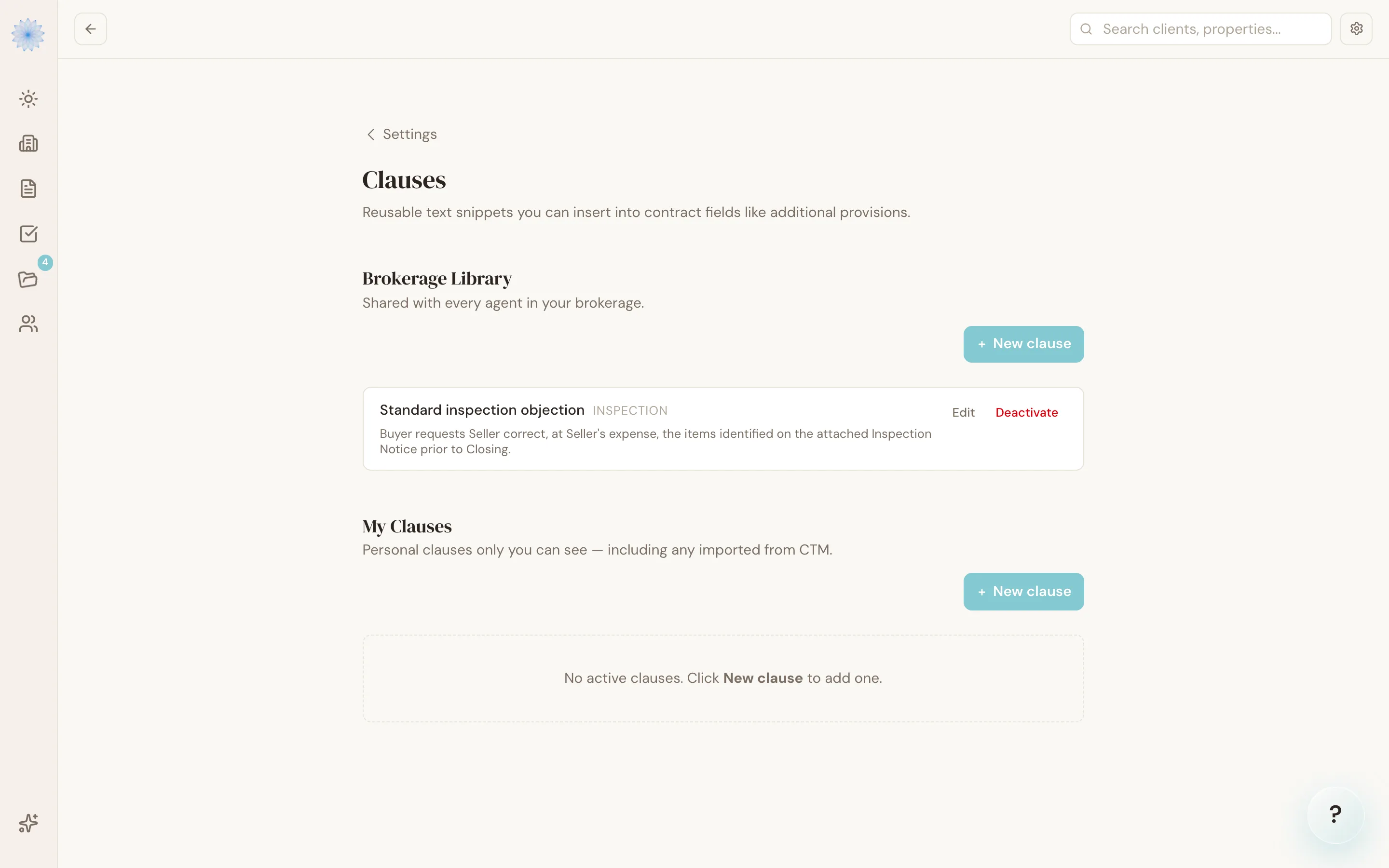
Managing your clauses
Open Settings → Clauses. Transaction coordinators (TCs) open the same editor from Settings: find the My clauses section and click Manage my clauses. What you see depends on your role:
- My Clauses — personal clauses only you can see, including any clauses imported from CTM eContracts (CTM). Every agent has their own personal section. Coordinators see only this section.
- Brokerage Library — clauses shared with every agent at your brokerage. Only brokers and admins can see and manage this section.
To add one, click New clause and fill in:
- Title — the short label you'll pick it by.
- Body — the actual clause text.
- Category — Inspection, Financing, Possession, General, or leave it uncategorized.
- Form codes — which forms this clause applies to (for example,
CBS1, CBS2). Leave it blank to make it available on every form.
Clauses you no longer use can be deactivated rather than deleted — they move to an Inactive list and can be reactivated later if you need them again.
Inserting a clause into a contract
Inside the contract editor, every multi-line write-in box (Additional Provisions, Exclusions, and similar fields) has a small + button anchored to its top-right corner.
- Click the + button on the field you want to add language to.
- A popover lists the clauses available for that form — pulled from both your personal clauses and your brokerage's shared library.
- Click a clause to insert it.
The clause text is appended to whatever's already in that field — it doesn't overwrite anything you've already typed there. The change saves automatically, the same as any other edit in the editor.
FAQ
I'm a coordinator. Can I edit my brokerage's clauses?
No. Coordinators manage only their own My Clauses list. The Brokerage Library stays with brokers and admins. Your personal clauses are visible only to you.
Can I use a clause on a form it's not tagged for?
No — a clause only appears in the insertion menu for the form codes you've listed on it (or every form, if you left that field blank). Add the form code to the clause to make it available there.
What's the difference between a clause and a saved template?
A clause is a reusable snippet of text you insert into one field. A saved template is a full set of field values for an entire form — see Filling out a contract for the Save as Template / Templates toolbar option.
If I edit a clause, does it change contracts I already inserted it into?
No. Inserting a clause copies its text into that field at that moment. Editing the clause later only affects future insertions.
Related articles
Still stuck?
Email support@done-deal.co and a real person will get back to you — usually the same business day.