
Sending a contract for signature
Once a contract is ready, you send it out for signature right from the contract editor. This covers the built-in signing flow — the fastest way to get a CBS1 or any other Done-Deal form signed without leaving the app.
Before you can send
Done-Deal runs a set of checks before it lets a contract go out:
- Every CREC-required field for that form must be filled in. If something is missing, you'll get a list of the exact fields to fix.
- For a CBS1, CP41, or AE41 that has been modified (sections deleted or fields changed since the original), you must confirm you've explained those changes to your client before Done-Deal will send it — this satisfies CREC §7.2.J.
- Demo contracts can never be sent for a real, legally binding signature.
If any of these checks fail, sending is blocked until you fix the issue.
Adding recipients
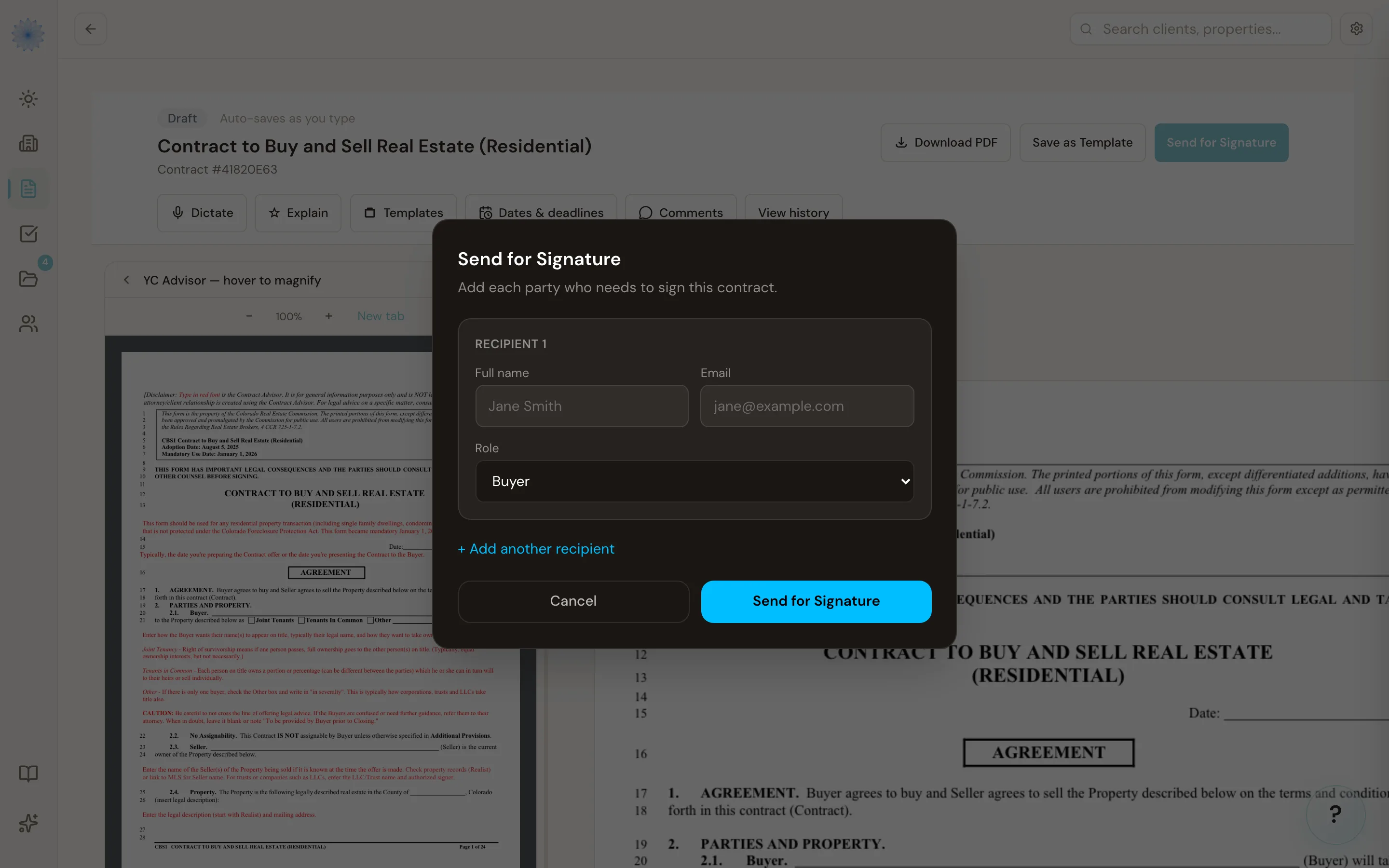
Click Send for Signature on the contract to open the send screen. Add each person who needs to sign:
- Enter their Name and Email.
- Choose their Role — Buyer, Seller, Buyer Agent, Seller Agent, or Other.
- Click + Add Recipient to add more parties, or the trash icon to remove one.
- Click Send for Signature to send.
You need at least one recipient with a name and email before you can send.
Note: You (the sending agent) are added as a signing party automatically, based on which side of the transaction you're on — you don't need to add yourself to the recipient list unless you want to override that.
Amendments and counter-proposals
If you're sending an amendment or counter-proposal (a contract created from an existing one), Done-Deal can carry forward the buyer and seller who already signed the original contract, so you don't have to retype them. The original contract must be fully signed first — Done-Deal pulls its signed parties automatically. For the very first CBS1 on a transaction, you always enter recipients by hand.
What happens after you send
- The contract's status changes to Sent.
- Every party — including you — receives an email with a unique, one-time link to review and sign the contract. See The signing experience for what that looks like on their end.
- Each signing link is valid for 14 days. After that, the recipient will need a new link from you.
- You get a notification once the contract has been sent.
Note: Built-in e-signature is one of two ways to collect a signature on a document in Done-Deal. If you'd rather route a document through your own DocuSign account, see The DocuSign integration.
FAQ
Can I see who still needs to sign?
Yes. The contract shows a Signatures panel with every recipient's status — signed (with the date, a masked IP address, and browser) or awaiting signature (with the link's expiration date).
Do all recipients have to sign in a specific order?
No — Done-Deal doesn't enforce a signing order for the built-in flow. Every recipient gets their link at the same time and can sign whenever they're ready.
Does sending a contract count as it being executed?
No. A contract is only marked executed once every required party has signed. Sending just starts the process.
Related articles
Still stuck?
Email support@done-deal.co and a real person will get back to you — usually the same business day.