
Using the broker dashboard
The broker dashboard gives brokerage admins a single view across every agent's transactions — not just their own. If your account has the Broker or Admin role at your brokerage, open the Settings menu in the top bar and click Brokerage View.
Note: The broker dashboard is a role, not an add-on. It's available to anyone whose account is set to the Broker or Admin role at your brokerage, regardless of which Done-Deal plan you're on. AI-related figures (like AI cost per deal) will read $0 if your brokerage doesn't use the AI TC add-on. See Plans and pricing.
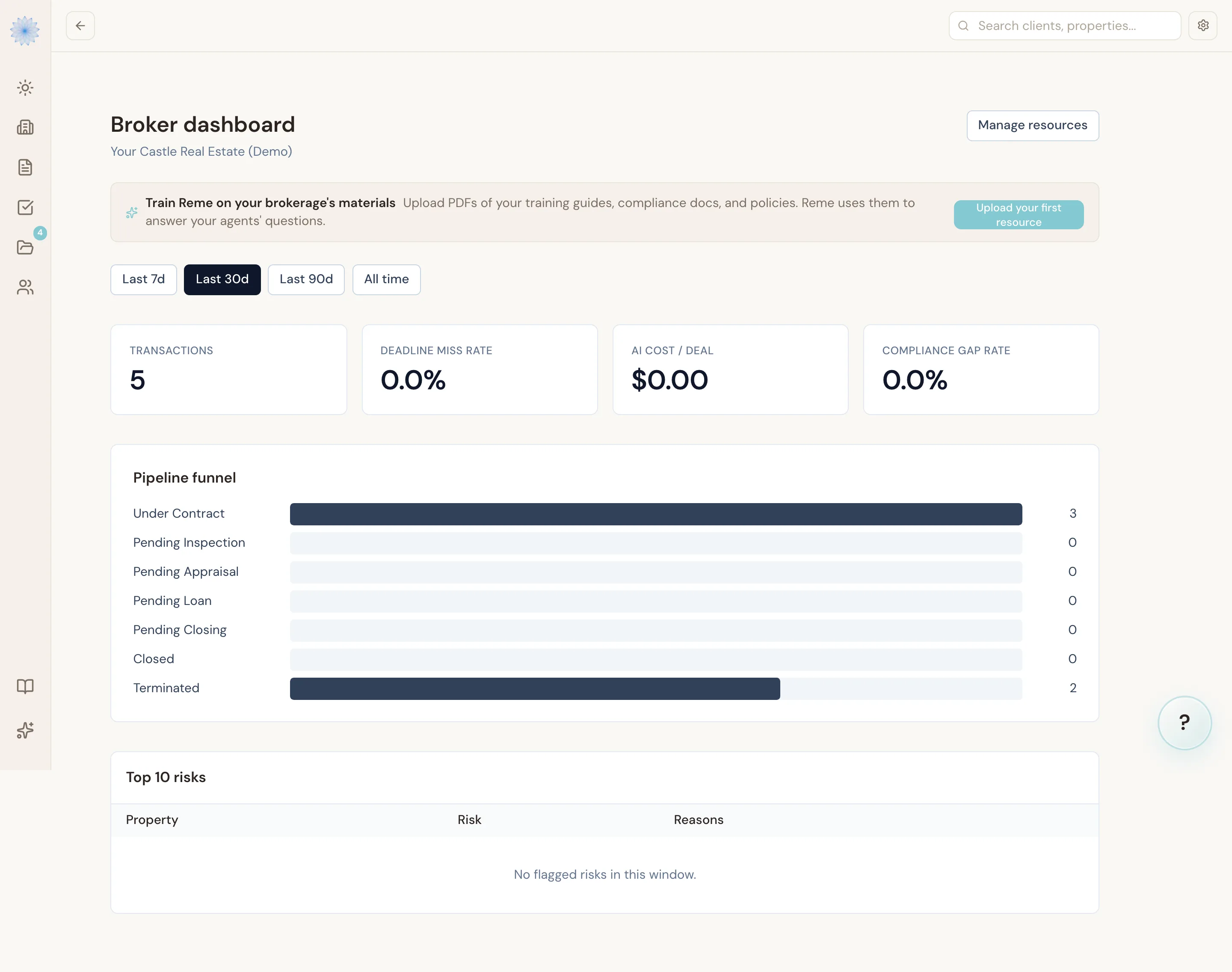
What you see
The dashboard is scoped to your brokerage automatically — it shows every transaction across every agent at your brokerage, not just your own transactions.
Time window
Use the window picker (Last 7d, Last 30d, Last 90d, All time) at the top to change the reporting period. It defaults to the last 30 days.
Stat cards
Four summary numbers, calculated for the selected window:
- Transactions — total count of transactions in the window.
- Deadline miss rate — the share of deadlines that were missed (past due and still pending, or marked breached). Turns amber at 15% or higher.
- AI cost / deal — Reme's average AI spend per transaction that had at least one AI call. Turns amber at $5.00 or higher.
- Compliance gap rate — the share of compliance requirements that are not yet complete, not applicable, or waived. Turns amber at 20% or higher.
Pipeline funnel
A bar chart of how many transactions are in each stage of the transaction lifecycle: Under Contract, Pending Inspection, Pending Appraisal, Pending Loan, Pending Closing, Closed, and Terminated. Done-Deal infers the inspection/appraisal/loan sub-stages from each transaction's open deadlines, so you can see where transactions are actually stuck, not just their top-level stage.
Top risks
A table of up to 10 transactions with the highest composite risk score, each with the reasons that drove the score — deadlines due soon, already-missed deadlines, and open compliance items. Click Drill down on any row to open that transaction's full detail page.
Viewing a transaction's detail page
Click Drill down from Top risks, or navigate to /broker/<transaction-id>, to see one transaction's full picture:
- Parties — everyone attached to the transaction (buyer, seller, agents, lender, title) with contact info on file.
- Documents — every document on the transaction, with a broker review control. As a broker, you can mark a document Approved or Flagged (with a note); agents see your review status as a read-only badge.
- Deadlines — every deadline with its due date, status, and risk level. Missed deadlines are highlighted.
- Compliance findings — the compliance requirements Done-Deal detected for the property, plus an advisory pre-check with any errors or warnings.
- Activity feed — the full audit trail for the transaction (every field edit, signature, and AI action), pulled into one unified timeline.
- AI cost breakdown — every AI call Reme made on this transaction, with model, prompt, token counts, and cost (last 200 calls).
Note: Approving or flagging a document is broker-only. Agents viewing the same transaction see your review status but can't change it.
FAQ
Who can see the broker dashboard?
Anyone whose agent account has the Broker or Admin role at your brokerage. Regular agents don't see this dashboard or anyone else's transactions.
Why is my "AI cost / deal" showing $0.00?
Either no transaction in the selected window has any recorded AI activity, or your brokerage doesn't have the AI TC add-on. Switch to All time to check for older activity, or see Plans and pricing.
Does the risk score mean a transaction is non-compliant?
Not necessarily. The risk score is a composite signal — deadlines due soon, missed deadlines, and open compliance items — meant to help you triage where to look first. Always open the transaction's Compliance findings section to see the specifics.
Can I export this data?
Not from the dashboard itself today. Use the transaction detail page's Activity feed and AI cost breakdown for a per-transaction record.
Related articles
Still stuck?
Email support@done-deal.co and a real person will get back to you — usually the same business day.